

Last updated: July 2026. Written by Tim du Toit, 39 years investing since 1987, founder of Quant Investing, author and published quant researcher.
Prefer to read offline? Download this guide as a PDF.
Quant Investing MCP — definition:
The Quant Investing MCP (Model Context Protocol) server is a secure connection that lets an AI assistant such as Claude run the Quant Investing screener, read the Quant Value and Shareholder Yield newsletter archives, and backtest strategies on your behalf — you ask in plain English and the AI calls the screener directly. It connects with one API key, exposes 32 tools, and is included with the Best Deal plan.
If you are a Best Deal subscriber, you can now ask Claude AI questions about the Quant Investing screener, both newsletters, and your own watchlists in plain English. Claude does the work of clicking, filtering, and reading. You get an answer in seconds.
This guide walks you through the five-minute setup. You will create an API key on your account page, add Quant Investing as a custom connector in Claude.ai, and run your first investing question.
- Setup time: about 15 minutes, one time.
- Tool count: 32 callable tools across the screener, both newsletters, personal data, and the backtest engine.
- Daily limit: 500 tool calls per API key per day. Backtest calls count as 5. Cached repeat answers do not count.
- Subscription required: Best Deal (Screener + Quant Value + Shareholder Yield Letter), EUR 79.70 per month or EUR 779.70 per year.
What you can do once Claude is connected:
- Screen 22,000+ companies on 110+ factors by asking in plain English - no filters you must click.
- Run your saved screens and 22 Guru Screens (Magic Formula, ERP5, Tiny Titans and ~19 more).
- Backtest a screen or both newsletters over 16 years of point-in-time data, dividends reinvested.
- Cross-check the newsletter portfolios and your watchlists with one question.
- 32 tools, 500 tool calls a day, one API key.
What you will need before you start
Three things, all of them free or already in place if you are a Best Deal subscriber.
- An active Best Deal subscription (Screener plus Quant Value newsletter plus Shareholder Yield Letter). EUR 79.70 per month or EUR 779.70 per year. Other Quant Investing subscriptions do not include MCP access.
- A Claude.ai account. Free, Pro, and Max plans all work for the connection itself. A paid Claude plan increases the daily message limit on Claude's side. The MCP server limit (500 calls per day) is separate.
- About five minutes.
Step 1. Generate your API key on your subscription page
Your API key is what tells the Quant Investing server which subscriber Claude is asking on behalf of. Without it Claude has no access.
- Log in to https://www.quant-investing.com
- Go to https://www.quant-investing.com/my-subscription.
- Scroll to the section headed My API Keys.
- Click the green link Create New API Key. If you do not have a Best Deal subscription you will instead see: "You need to have the Best Deal subscription to access API keys. Click here to subscribe."
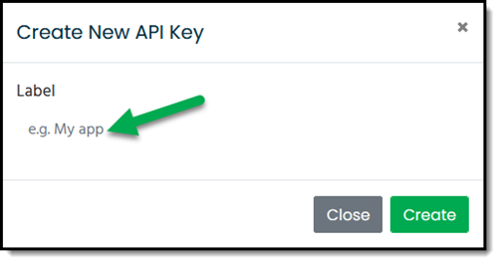
- In the window that opens, type a name for your key in the field that shows "e.g. My App". The name is for your own reference only. Use something like "My Claude" or "Laptop".
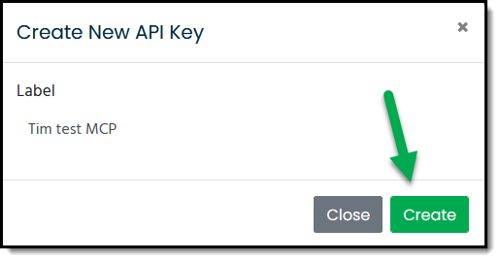
- Click the Create button.
- Click the Copy button and save the key in a safe place, for example your password manager. The key is shown only once. If you lose it you have to create a new one.
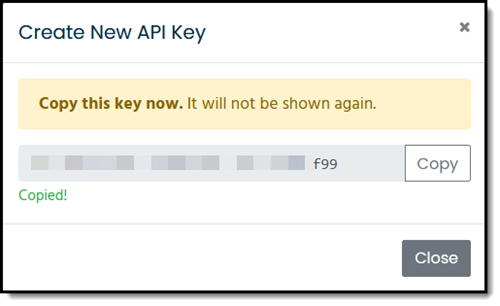
The key looks similar to this:
qi_live_a1b2c3d4ezu765eh8i9j0k1l2m3n4o5p
Treat the key like a password. Anyone who has it can read your subscriber data and your watchlists.
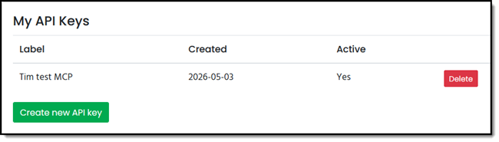
Once you have set it up successfully your subscription page should look like this.
Step 2. Add Quant Investing as a custom connector in Claude.ai
You stay in control and you can undo this in 30 seconds.
The connection is read-only: Claude can look at screener and newsletter data, it cannot trade, spend, or change anything in your account. Want it gone? Open Claude’s Connectors settings and remove it. That takes about 30 seconds, and your you can then delete the API key on the quant-investing.com website. Nothing to uninstall, nothing permanent.
The full Anthropic documentation is available at Get started with custom connectors using remote MCP on the Claude help site. The short version is below.
If you are on a Claude Pro or Max plan
- Open Claude.ai (web or desktop) and click your profile icon. Go to Customize > Connectors.
- Click the + button and choose Add custom connector.
- Name the connector QuantInvesting. Type it exactly as one word QuantInvesting with no space and no hyphen.
- In the URL field paste this address, replacing the placeholder with the API key you copied in Step 1:
https://mcp.quant-investing.com/mcp?api_key=YOUR_API_KEY_HERE
Your complete URL looks like this:
https://mcp.quant-investing.com/mcp?api_key=qi_live_a1b2c3d4e5f6g7h8i9j0k1l2m3n4o5p
- Leave every other field blank. No authentication header is needed. The key in the URL is the authentication.
- Click Add. Claude will fetch the tool list. After a few seconds you should see a notice along the lines of "32 tools available".
- Start a new Claude chat. Type
/and the Quant Investing tools should appear in the slash menu.
If the tools do not show up, disconnect the connector, reconnect it, and start a fresh Claude chat. Claude only refreshes the tool list on a new connection.
Name it exactly QuantInvesting — one word, no space.
This is the one step people get wrong. The name is not just a label Claude uses it to call the tools. A space (for example "Quant Investing") or a hyphen makes every screen fail even though the connector shows as connected. Type the name as one word, QuantInvesting, with no space and no hyphen. If yours already has a space, remove the connector, add it again with the one-word name, and start a fresh Claude chat.
Step 3. Ask Claude your first question
Open a new chat. Start every question with the same prefix so Claude knows which connector to use:
Paste this as your very first message to check it works:
Use the QuantInvesting MCP to show me my quota status.
(If Claude comes back with your daily quota, you are connected. This one is free, it does not use up any of your 500 daily calls.)
If the tools don’t show up
- Check the name first — it must be QuantInvesting, one word, no space, no hyphen.
On claude.ai in a browser: Settings → Connectors → QuantInvesting → Disconnect, then Reconnect, then start a fresh Claude chat. - On the Claude desktop app: it caches more aggressively — remove the connector completely, add it again from the URL, then open a new chat.
- "Unauthorized" / 401: the API key in the URL is mistyped or was regenerated. Copy a fresh key from My Subscription and paste the whole URL again (see the URL above).
Five questions that work today, in order of difficulty:
- Discovery: "Use the QuantInvesting MCP. What is my quota status?" Claude calls
get_my_quotaand reports your remaining tool calls for the day. No quota is consumed. - Live screen: "Use the QuantInvesting MCP. Show me the top 20 European stocks by F-score above seven with ROIC above 15 percent and trading below 10 times earnings." Claude calls
screen_stockswith the right filters and formats the result. - Saved screen: "Use the QuantInvesting MCP. Run my saved screen called Quality Cheap and give me the top 30." Claude calls
run_saved_screen. - Backtest: "Use the QuantInvesting MCP. Run a 12-month rolling backtest on my Quality Cheap screen from January 2018 until today with sort_by='earnings_yield'." Claude calls
evaluate_screen_history. Costs 5 quota units. If you want to know what the backtest actually does, see our guide on how to back test your investment strategy. - Newsletter: "Use the QuantInvesting MCP. Backtest the Quant Value newsletter portfolio from January 2020 in EUR with EUR 100,000 starting capital." Claude calls
backtest_portfolio. The Quant Value newsletter has a 15-year track record for you to verify the result against.
Stuck at any point? Reply to any Quant Investing email, or use the Need Help button (bottom right of your screen) and we’ll walk you through it, a real person, usually the same day. Most people are up and running inside 15 minutes; if you are not, that is on us to fix, not on you.
| What you want | Ask Claude |
|---|---|
| Check it works | “Use the QuantInvesting MCP to show me my quota status.” |
| Screen for stocks | “Use the QuantInvesting MCP to find European stocks with an earnings yield above 10% and a Piotroski F-score of at least 7.” |
| Run a strategy | “Use the QuantInvesting MCP to run the Magic Formula screen and show me the top 20.” |
| Backtest | “Use the QuantInvesting MCP to backtest the Quant Value newsletter since 2010 in euros, and show the return, CAGR and worst drawdown.” |
| Filter by exchange | “Use the QuantInvesting MCP to show me the best 20% momentum stocks listed on the London Stock Exchange.” |
Tip: start every question with “Use the QuantInvesting MCP to…” so Claude reaches for the screener.
How the daily quota works
Every API key has the same allowance. The rule is simple.
| Tool type | Quota cost per call | Counts toward 500/day limit |
|---|---|---|
| Standard tools (screen, search, list, get_stock_detail, all newsletter tools, all personal data tools) | 1 unit each | Yes |
| Backtest tools (get_screen_snapshot, evaluate_screen_history, evaluate_newsletter_portfolio, backtest_portfolio) | 5 units each | Yes |
| get_my_quota and get_cache_stats | 0 units | No, free |
| A repeat backtest that lands on a cached result | 0 units | No, free for 7 days from first run |
Daily reset at 00:00 UTC. A standard subscriber day looks like roughly 50 to 100 standard tool calls plus 5 to 10 backtests, well inside the limit.
Ready to put Claude on your Quant Investing screener?
The MCP connection is included with every Best Deal subscription. You get the Quant Investing screener, the Quant Value newsletter, the Shareholder Yield Letter, and the AI connector under one yearly price.
Start your Best Deal subscription
100% money-back guarantee within 30 days. No questions asked.
What you can do once it is set up
The five examples above are starting prompts. Beyond them the MCP can do four things that previously required Excel, SQL, and an afternoon:
- Cross-reference your watchlist against the newsletter portfolio in one question. "Use the Quant Investing MCP. Which active Quant Value picks are already in my Core Compounders watchlist, and which are missing?"
- Reopen any historical pick from the 16-year archive. "Use the Quant Investing MCP. Pull the original analysis text for the 2018 Celestica recommendation, then compare those criteria against today's screener data."
- Audit your own saved screens for sort-order problems. Many saved screens silently fall back to ranking by market cap when the template has no explicit sort. "Use the Quant Investing MCP. Run audit_saved_screens. Which of my screens have no explicit sort order?"
- Run a real strategy backtest with dividends reinvested. The engine includes Sharpe, Sortino, Calmar, intra-period drawdown via a monthly-sampled equity curve, and an equal-weighted universe benchmark. Read more on our approach in the QI Value investment strategy page.
Get the screener, both newsletters, and the AI connector in one bundle
The MCP only works because the live screener, 16 years of Quant Value picks, and three years of Shareholder Yield Letter analyses sit in the same database. The Best Deal subscription is the only place all three meet.
Subscribe to Best Deal and connect Claude today
100% money-back guarantee within 30 days. No questions asked.
The MCP connector vs the website screener. Same data, different way in. On the website you click filters; through the MCP you ask Claude in plain English and it builds the screen for you. The connector can also do two things the website cannot: filter by the exchange a stock actually trades on (65 exchanges), and backtest a whole newsletter or saved screen for you in one question.
A screener you can use inside Claude and other AI agents. Quant Investing is an investing screener with 16 years of newsletter ideas and it plugs straight into Claude through the Model Context Protocol (MCP), so an AI assistant can screen, look up a company, and backtest for you. Unlike a raw financial-data API, you are not getting numbers to wire up yourself: you get a ready-to-use screener, ready-made strategies and a live track record, all answerable in plain English.
Frequently asked questions
What is the Quant Investing MCP and how is it different from an API?
The MCP is a Model Context Protocol server published by Quant Investing. It exposes 32 tools (screener filters, backtests, newsletter lookups, your watchlists) to Claude AI in a structured format Claude understands. A traditional API returns raw JSON for a developer to parse. The MCP is designed for a large language model to call directly during a chat. You do not write any code.
Which subscription do I need?
The Best Deal subscription (Screener plus Quant Value newsletter plus Shareholder Yield Letter). EUR 79.70 per month or EUR 779.70 per year. The MCP is not sold as a separate add-on. A screener-only or newsletter-only subscription does not include API key generation.
Do I need a paid Claude account?
No. The MCP works with the free Claude.ai plan. A Pro or Max plan increases the daily message limit on Claude's side, which matters if you ask hundreds of questions a day. The Quant Investing daily limit (500 tool calls per key) is separate from Claude's message limit.
How long does the setup take?
About five minutes total. Two minutes to generate the API key on /my-subscription. Two minutes to add the connector in Claude.ai. One minute for your first question.
How do I know it is working?
After adding the connector, type "/" in a new Claude chat. The Quant Investing tools should appear in the slash menu. If they do not, disconnect the connector, reconnect it, and start a fresh chat. The first call after a long idle period takes about 2 seconds (Cloudflare warming up the connection). Subsequent calls in the same chat are typically under 300 milliseconds.
What is the daily limit?
500 tool calls per API key per day. Reset at 00:00 UTC. Standard tools cost 1 unit. The four backtest tools cost 5 units each. get_my_quota and get_cache_stats are free and do not count. Cached results returned in under 100 milliseconds also do not count. The 7-day cache means repeat backtests are effectively free.
What is a saved screen and can I run my own?
A saved screen is any screener filter configuration you have saved inside your Quant Investing account. Examples: a Magic Formula screen, a Quality Cheap screen, a QI Value strategy. Ask Claude "Use the Quant Investing MCP. List my saved screens." then "Run my X screen and give me the top 30."
Can I cancel after I start the subscription?
Yes. The Best Deal subscription carries a 100% 30-day money-back guarantee. No questions asked. After 30 days the subscription continues until cancelled.
Is my data private?
Yes. The API key is bound to your subscriber account and stored only as a SHA-256 hash on the server. Your personal data (watchlists, alerts, comments, saved screens) is scoped automatically to your user_id. No other subscriber can see your data through the MCP.
What if I lose my API key?
Create a new one on /my-subscription. The old key keeps working until you choose to revoke it. Each subscriber can hold multiple keys (one for each device, for example).
Can I use it with ChatGPT or another AI tool?
The MCP specification is open. Any client that supports remote MCP servers can connect with the same URL and key. Today Claude.ai has the most complete MCP client. ChatGPT support is on Anthropic's published interoperability roadmap.
How is this different from Stockopedia, Simply Wall Street, or Stock Rover?
None of those services currently expose an MCP connection to Claude or any other AI model. None of them combine a 16-year newsletter archive with live screener data in one query. The Quant Investing combination of live screener, 16 years of Quant Value plus 3 years of Shareholder Yield Letter content, and a working backtest engine is currently unique.
Can I use the Quant Investing screener inside Claude or other AI agents?
Yes. Quant Investing publishes a Model Context Protocol (MCP) server, so any MCP-capable AI client — Claude on the web or desktop today — can run the screener, read the newsletters and backtest by asking in plain English. It is included with the Best Deal plan and connects with one API key.
Does it work with ChatGPT?
The connector uses the open Model Context Protocol, so it works with any client that supports MCP. Today that is Claude (claude.ai and the desktop app). As other assistants add MCP support, the same connector and key will work there too — nothing to rebuild.
How is this different from a financial-data API?
An API hands you raw numbers to program against. The Quant Investing MCP hands an AI a finished screener: 24,000+ companies on 200+ factors, ~20 ready-made strategies, 16 years of backtestable history and two newsletter portfolios — all answerable in plain English, no code.
How long does setup take?
A: About 15 minutes, once. You generate an API key, add one connector in Claude, and paste a first question. After that it just works.
Is my data safe, and can I remove it?
The connection is read-only — Claude can read screener and newsletter data but cannot trade or change your account. You can remove the connector in Claude’s settings in about 30 seconds at any time, and your API key keeps working on the website.
Keep this guide for later
If you set up the connection from a different device, the PDF version has the same screenshots and steps in one file.
Download the setup guide as PDF
Single file, includes the three screenshots.
Everything the screener and the MCP connector return is general, data-driven information for your own research. It is not personalised investment advice. Prices fluctuate and you can lose money; past performance is not a guarantee of future results.